Capture What You See on Your Desktop
Here's the scenario: while browsing through the internet, you see an image that grabs you. But once you hit right-click, you find out that the picture cannot be saved—or there is a scene in the video you’re watching that you want to save as an image, but you would have to download an MP4 to JPG converter to do that. Lucky for you, there are various utility applications available nowadays that can help you take a screenshot of your desktop. Among those is ScreenShooter. This app provides you with an accessible method to capture anything that you see on your computer screen.
Lightweight and Easy-to-Use
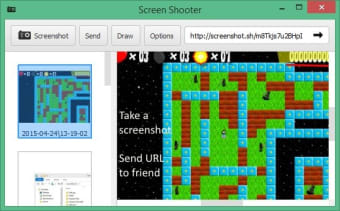
ScreenShooter is a lightweight, user-friendly, and intuitive piece of software. Working with it will not pose many difficulties. It also does not need any familiarizing, even if you don’t have any prior knowledge of such a software solution. Its main window is well-structured, giving you quick access to the important features. Once launched, you only need to click the screenshot button and select the area in your screen that you wish to capture.
Editing Function
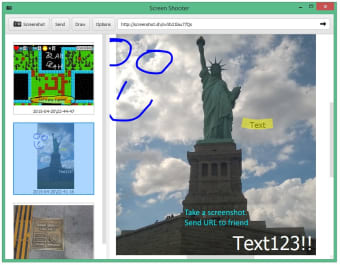
ScreenShooter’s capabilities do not end with screen capture. It also comes with basic editing tools that let you tweak your grabbed images. The provided image editing tools are as simple as the app itself. You can use the pen and highlighter to add a few elements to your pictures. You can also blur a few areas of the snapshot and add text, arrows, pins, and even geometrical shapes. These editing tools are pretty basic, so if you wish to edit your screenshots further, you will have to use a program intended for that.
ScreenShooter also comes with a built-in color picker, which can be very helpful, especially for web developers.
Instant Sharing
Normally, to share your screenshot, you will need to save them in your computer’s storage and send them as an attachment. But with ScreenShooter, you can share your captured images using a generated link. That’s right—the app generates a URL whenever you grab a screenshot, which you can copy and share with any of your contacts. Anyone who receives the link will be able to see your screenshot. Moreover, ScreenShooter allows integration with cloud storage services. You only need to move the screenshots directory inside your cloud storage directory.
Quite Capable but Needs Improvements
To sum it up, ScreenShooter is an efficient solution when you want to save, capture, or share a snapshot of your computer’s workspace. However, while it is quite capable, it still lacks a few features. For one, it only has a single style of capturing photos, and do not allow capturing windows, scrolling menus or free-hand areas. Its editing function is also limited. If you are looking for a screen capturing app that gives you more options, you will have to look elsewhere.